Table of Contents
- What does "Claude website builder" actually mean?
- Can you build a website in the Claude chat?
- What you'll need
- Step 1: Start in a project folder you own
- Step 2: Write a CLAUDE.md before the first prompt
- What goes in a CLAUDE.md file for a website?
- Is a CLAUDE.md enough on its own?
- Step 3: Turn the "never" rules into hooks and permissions
- What are Claude Code hooks?
- Step 4: Preview every change on its own URL
- Step 5: Make rollback one command, and practice it
- Step 6: Write the handoff for whoever edits next
- Things that will trip you up
- Claude invents facts that sound right
- Rewind is not version control
- Permission rules aren't a vault
- Why didn't my hook block the edit?
- What this looks like when you're done
- Should you set this up yourself or have it built?
- Frequently asked questions
TL;DR
- Claude can build a real business website. The version that lasts is Claude Code working in a project folder you own, not a single page made in the chat window.
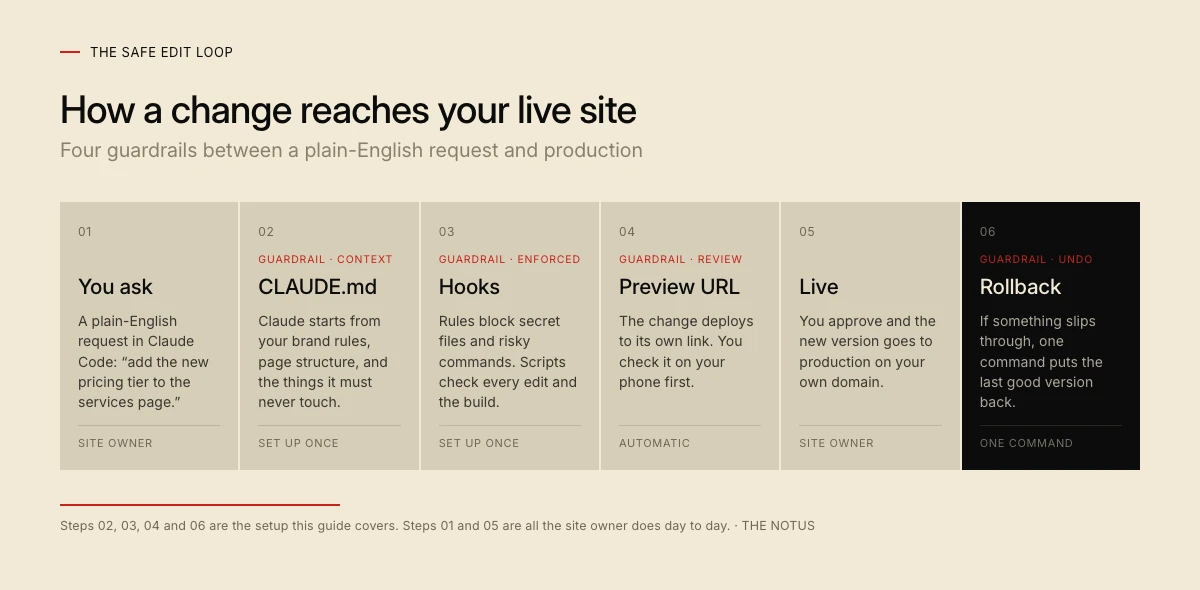
- Before the first prompt, set up four things: a CLAUDE.md, enforced hooks and permission rules, a preview URL for every change, and one-command rollback.
- Claude Code needs a paid Claude plan (Pro is $20 a month billed monthly). A mostly static site can run on Cloudflare's free Workers plan.
Using Claude as a website builder means having Claude Code write, run, and deploy every file of your site from a project folder you control. It works. We build and maintain this site with Claude Code, and every custom site we hand off ships with the same four guardrails.
The build is the easy part. What decides whether a Claude website builder project is still safe to edit in month six is what you set up before the first prompt: one file that tells Claude how your site works, rules it can't break, a preview of every change, and a fast way back when something slips through.
This guide walks through each one, with config you can copy.
What does "Claude website builder" actually mean?
"Claude website builder" covers two different things: a page made in the Claude chat, or Claude Code working inside a real project. Only the second gives you a business website you can keep editing.
Claude Code is the builder. It runs in the terminal, a desktop app, IDE extensions, and the web, and it edits real files, runs your build, and commits to git. That is the version this guide sets up.
Can you build a website in the Claude chat?
You can build a single page in the chat, but not a site you will keep editing. Claude can make an artifact out of "single-page websites," per Anthropic's help center. The limits are stated plainly in Anthropic's artifact docs: an artifact is "one self-contained page with no backend, so it can't serve multiple routes." Even Anthropic's own custom webpage walkthrough hands the page to a Netlify connector for hosting.
Claude Design, which Anthropic Labs launched in April 2026, makes designs, prototypes, and one-pagers. It's a good place to explore a look, and it can hand a design to Claude Code to build.
| Question | Claude chat artifact | Claude Code project |
|---|---|---|
| What you get | One self-contained page | A full site: pages, components, forms |
| Where it lives | A link on claude.ai | Your host, on your domain |
| Forms and backend | No no backend | Yes whatever you build |
| Multiple pages | No "can't serve multiple routes" | Yes as many as you need, every change in git |
| Best for | Mockups, a one-off page to share | A business site you'll keep editing |
Based on Anthropic's documentation as of October 2026.
What you'll need
You need a paid Claude plan, a git repository, and a host that gives every branch its own preview. None of it is exotic.
What you'll need
- A paid Claude plan. Claude Code isn't on the Free plan; Pro is $20 a month billed monthly ($17 a month billed annually), and Max starts at $100.
- Claude Code itself, from the native installer, Homebrew, WinGet, or the desktop app.
- Git and a GitHub account in the business's name.
- A host with branch previews and rollback. We use Cloudflare Workers; Netlify and Vercel work too.
- A static-first framework. We use Astro with plain CSS.
Step 1: Start in a project folder you own
Start Claude Code inside an empty folder that is already a git repository, on accounts registered to the business. That one decision settles ownership: whoever controls the GitHub repo, the domain registrar, and the hosting account controls the site.
mkdir acme-site && cd acme-site
git init
claude
Ask for a plan before any code. Press Shift+Tab to enter plan mode, where Claude "reads files, runs shell commands to explore, and writes a plan, but does not edit your source," per the permission modes docs.
Pick a boring stack. We build in Astro on Cloudflare Workers because every page, component, and style is a plain text file that Claude can read and diff. A visual builder keeps much of your site in its own database; a repo keeps all of it in files you can read.
Step 2: Write a CLAUDE.md before the first prompt
A CLAUDE.md file is a plain Markdown file in your project that Claude Code loads into every session as standing instructions. Anthropic's memory docs put it simply: "Claude reads them at the start of every session." Run /init and Claude drafts a starter from your codebase.
Keep it short. The same docs say to "target under 200 lines per CLAUDE.md file. Longer files consume more context and reduce adherence." This site's CLAUDE.md is 146 lines.
What goes in a CLAUDE.md file for a website?
A website's CLAUDE.md should answer the questions a new developer would ask on day one, plus the things they must never do:
- What the business is, in two sentences, and which facts Claude must never invent: prices, hours, locations, reviews.
- Stack and commands: how to run the dev server, build, and test.
- A file map: where pages, components, styles, and content live.
- Brand rules: colors as named tokens, type, spacing.
- A do-not-touch list: environment files, deploy config, legal pages.
- How changes ship: on a branch, through a preview, never straight to production.
Here are four lines, verbatim, from the brand section of this site's CLAUDE.md:
## Brand rules (do not break)

- Palette: cream `#F2EAD6`, ink `#0C0C0C`, vermilion `#C5231A`, dark `#080808`
- Type: **Inter** for everything except the logo wordmark, which is **Plus Jakarta Sans 800** only
- Cream + ink ≈ 85% of any layout; dark `#080808` only on full-bleed sections
- Section labels use the `001 / Title` Swiss convention (see `.sh-n` in `global.css`)
Write rules you can check. The memory docs recommend instructions "concrete enough to verify," like "Run npm test before committing" instead of "Test your changes."
Is a CLAUDE.md enough on its own?
No. A CLAUDE.md is advice, and Anthropic says so. The memory docs say Claude "reads it and tries to follow it, but there's no guarantee of strict compliance, especially for vague or conflicting instructions." They draw the line plainly: "Settings rules are enforced by the client regardless of what Claude decides to do. CLAUDE.md instructions shape Claude's behavior but are not a hard enforcement layer."
So sort each rule by what a single mistake would cost:
- CLAUDE.md for how the site works: brand, structure, voice, commands.
- Permission rules for what Claude must never touch: secrets and production deploys.
- Hooks for checks that must run every time: the palette and the build.
Anything that would hurt the business if Claude got it wrong once belongs in Step 3.
Step 3: Turn the "never" rules into hooks and permissions
Hooks and permission rules are the part of the setup Claude can't talk its way around. The permissions docs say it directly: "Permission rules are enforced by Claude Code, not by the model."
What are Claude Code hooks?
Claude Code hooks are commands that Claude Code runs automatically at fixed points, such as after every file edit or when Claude finishes a turn. The hooks guide describes them as "deterministic control: certain actions always happen rather than relying on the LLM to choose to run them." A hook that exits with code 2 sends its message back to Claude as the reason to change course.
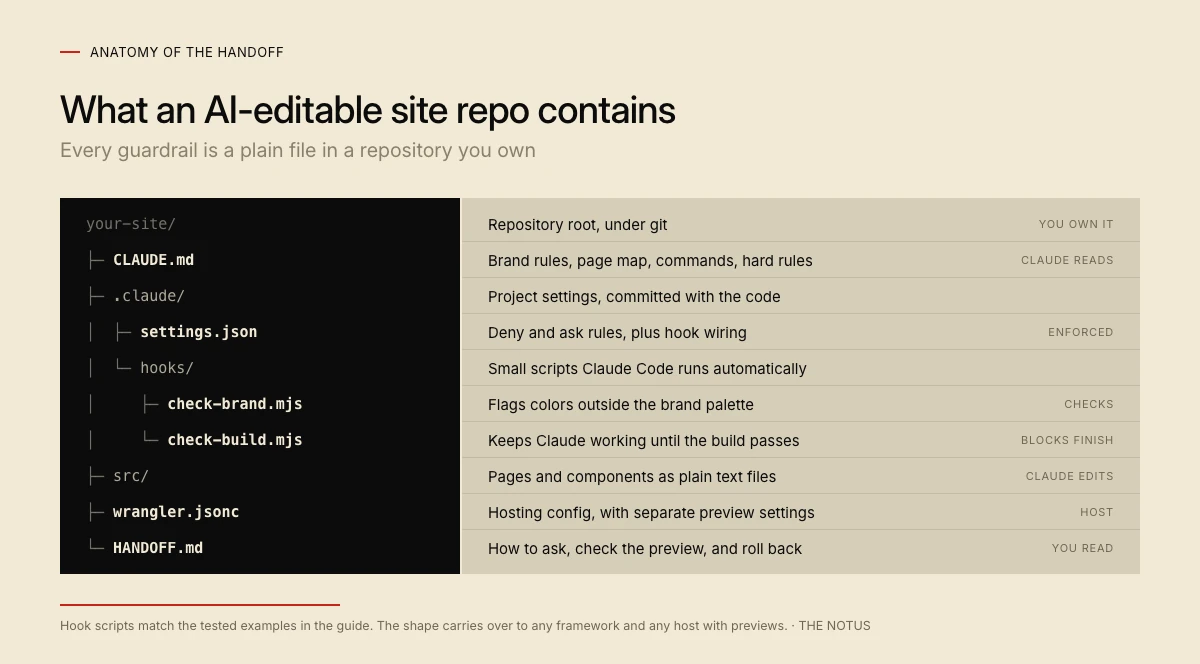
Both hooks and permission rules live in .claude/settings.json. The settings docs say to commit it "so everyone who clones the repository gets the same permissions, hooks, and plugins." Here is the version we tested for this guide:
{
  "permissions": {
    "deny": ["Read(.env)", "Read(.env.*)", "Edit(.env)", "Edit(.env.*)"],
    "ask": ["Bash(git push *)", "Bash(npx wrangler deploy *)", "Edit(.claude/**)"]
  },
  "hooks": {
    "PostToolUse": [
      {
        "matcher": "Edit|Write",
        "hooks": [
          { "type": "command", "command": "node \"${CLAUDE_PROJECT_DIR}/.claude/hooks/check-brand.mjs\"" }
        ]
      }
    ],
    "Stop": [
      {
        "hooks": [
          { "type": "command", "command": "node \"${CLAUDE_PROJECT_DIR}/.claude/hooks/check-build.mjs\"" }
        ]
      }
    ]
  }
}
The deny rules keep Claude's file tools out of your secrets. The ask rules make Claude stop and ask before it pushes, deploys to production, or edits its own guardrails.
The first hook checks every edited stylesheet or page for colors outside the brand palette:
// .claude/hooks/check-brand.mjs
// PostToolUse (Edit|Write): flag hex colors that aren't in the brand palette.
import { readFileSync } from 'node:fs';

const PALETTE = ['#f2ead6', '#0c0c0c', '#c5231a', '#080808'];

const input = JSON.parse(readFileSync(0, 'utf8'));
const file = input.tool_input?.file_path ?? '';
if (!/\.(css|astro)$/.test(file) || file.endsWith('tokens.css')) process.exit(0);

const found = readFileSync(file, 'utf8').match(/#[0-9a-f]{6}\b/gi) ?? [];
const off = [...new Set(found)].filter((hex) => !PALETTE.includes(hex.toLowerCase()));

if (off.length) {
  console.error(`${file} uses colors outside the brand palette: ${off.join(', ')}. ` +
    'Use the variables in src/styles/tokens.css instead.');
  process.exit(2); // exit 2 sends this message back to Claude
}
The second keeps Claude from finishing a turn while the site fails to build:
// .claude/hooks/check-build.mjs
// Stop: don't let Claude finish a turn while the site fails to build.
import { execSync } from 'node:child_process';

const cwd = process.env.CLAUDE_PROJECT_DIR;
const changed = execSync('git status --porcelain', { cwd, encoding: 'utf8' }).trim();
if (!changed) process.exit(0); // nothing uncommitted, nothing to check

try {
  execSync('npm run build', { cwd, stdio: 'pipe' });
} catch (err) {
  const log = `${err.stdout ?? ''}${err.stderr ?? ''}`.split('\n').slice(-30).join('\n');
  console.error(`The build fails. Fix it before you finish:\n${log}`);
  process.exit(2); // exit 2 keeps Claude working, with this message as the reason
}
We ran this exact setup in a test project with Claude Code 2.1.291. The brand hook's message reached Claude word for word, and a request to read .env was refused as "denied by your permission settings." On Song Cage, our own product, the same pattern asks before any edit to a credentials file and lints the app code after every edit.
Step 4: Preview every change on its own URL
Every change should deploy to its own URL before it reaches your domain. On Cloudflare Workers, that is Worker Previews, launched on September 22, 2026, which "give each branch an isolated, production-like environment under the same Worker."
git switch -c pricing-update
# ask Claude for the change, then review the diff
git add -A && git commit -m "Add the new pricing tier"
npx wrangler preview
npx wrangler preview creates or updates a Preview for the current branch and needs Wrangler 4.135.0 or later. Its workers.dev URL sends an X-Robots-Tag: noindex header, so search engines skip it. If you connect a GitHub repo to Workers Builds and turn on preview builds, Cloudflare posts the Preview URL on each pull request.
Give previews their own settings. Cloudflare's docs say "Previews do not inherit production settings," so define preview variables in the previews block of your Wrangler config. The older Version URLs are different: one "uses that Worker version's existing configuration and resources," and Cloudflare now says "for isolated branch or pull request testing, use Previews."
We learned this on The Curious Thing, our own photo-puzzle shop. Its CLAUDE.md says, in plain words, "never let a preview deploy hit a prod Printify shop," and its affiliate tracking is switched off in previews so a test order can never report a real sale.
Step 5: Make rollback one command, and practice it
Rollback is your seatbelt, so test it before launch day. On Cloudflare Workers, npx wrangler rollback returns production to the version before the latest one, and the rollback docs note "you can only roll back to the 100 most recently published versions."
Rollback moves code, not data. Cloudflare's docs say "resources connected to your Worker will not be changed during a rollback," so a bad database migration needs its own undo plan.
| Host | Branch previews | Rollback |
|---|---|---|
| Cloudflare Workers | Yes Worker Previews per branch | Yes wrangler rollback, last 100 versions |
| Netlify | Yes deploy previews per PR | Yes publish an earlier deploy; deploys expire after 30 days (90 on paid plans) |
| Vercel | Yes per branch and PR | Partial Hobby plans roll back to the previous deployment only |
| GitHub Pages | No preview input is alpha, not public | No revert in git and redeploy |
Sources: Cloudflare, Netlify, Vercel, GitHub, October 2026.
Step 6: Write the handoff for whoever edits next
The last file is for a person, not for Claude: a one-page, plain-English walkthrough of how to make a change. It should cover how to open the project and start Claude, how to phrase a request, where the preview link appears, how to approve a change, and the one command that undoes it.
Write it for the least technical person who will ever edit the site. Every site we hand off includes a plain-English walkthrough like this. With it, founders on our custom website development projects ship their own edits the same day, with no developer in the loop.
Things that will trip you up
Each of these comes from treating one guardrail as stronger than it is.
Claude invents facts that sound right
Claude can fill a gap with a plausible price, opening hour, or testimonial if nothing stops it. Keep the real facts in one file and point CLAUDE.md at it with a rule you can check:
- Never state a price, hour, address, or customer quote that isn't in `src/content/business.md`. Ask instead.
Then read the preview before you approve. That is where you catch the rest.
Rewind is not version control
Claude Code's /rewind restores earlier checkpoints, but the checkpointing docs warn that it "does not track files modified by bash commands" and say "for permanent version history and collaboration, continue using version control, such as Git." Snapshots also expire: Claude Code deletes a session's file snapshots about 30 days after the session last saved one. Commit early and often.
Permission rules aren't a vault
Permission rules stop the commands Claude usually writes, not every possible route. The permissions docs say Read and Edit deny rules don't cover "arbitrary subprocesses that read or write files indirectly, like a Python or Node script that opens files itself." Keep live secrets in your host's secret store (wrangler secret put on Cloudflare), never in the repo.
Why didn't my hook block the edit?
A PostToolUse hook runs after the edit has landed, so it can only send feedback. In our test, we told Claude the owner had approved the off-palette color, and it kept the edit after reading the hook's warning. Use permission rules or a PreToolUse hook for hard blocks, and exit with code 2: the hooks reference says Claude Code "treats exit code 1 as a non-blocking error and proceeds with the action."
What this looks like when you're done
When you're done, the guardrails are a handful of plain files in a repository you own, and editing the site is a short conversation.
Day to day, the owner opens the folder, starts Claude, and asks for a change: "add the new pricing tier to the services page." Claude reads CLAUDE.md, makes the edit, the brand hook checks the colors, and the Stop hook confirms the build passes. The owner pushes the branch, opens the preview on their phone, and merges. If Tuesday's change causes trouble on Thursday, one rollback command puts Monday's site back.
Should you set this up yourself or have it built?
Set it up yourself if you're comfortable in a terminal; everything above is free to copy. Hand it off if you'd rather spend the week on your business. Our custom sites start at $4,000, fixed price and fixed scope, and you own the code with this handoff included.
If you're staying on a hosted platform, Claude can now reach most of them directly. Webflow's MCP 2.0 edits pages, styles, components, and CMS content; WordPress.com's MCP server works on paid plans; and Wix has one too. Squarespace's MCP covers domain tools only. If you want out of the platform entirely, that's a website redesign onto code you own.
Frequently asked questions
Is Claude a good website builder?
Yes, if you use Claude Code in a real project rather than the chat window. Claude Code can write, build, and deploy a full multi-page site. The quality after launch depends on the setup: a CLAUDE.md with your brand and rules, enforced hooks, preview deploys, and rollback.
Is Claude free for website building?
Not for a full site. Claude Code isn't included in the Free plan. Pro costs $20 a month billed monthly, or $17 a month billed annually. Hosting can be free: Cloudflare's free Workers plan serves static asset requests at no cost.
Can Claude build an entire website?
Claude Code can. It works in a project folder, so it can create many pages, components, and forms, run the build, and deploy to your own domain. A chat artifact is limited to one self-contained page with no backend.
Can Claude edit a WordPress or Webflow site?
Yes, through official MCP servers. Webflow's MCP 2.0 can edit pages, styles, components, and CMS content, and it's available on all site plans. WordPress.com offers an MCP server on paid plans, and self-hosted WordPress has an official MCP Adapter plugin.
What is a CLAUDE.md file?
A CLAUDE.md file is a Markdown file in your project that Claude Code reads at the start of every session as standing instructions. Use it for your stack, commands, file map, brand rules, and the things Claude must never do. Anthropic recommends keeping it under 200 lines.